Overall Architecture
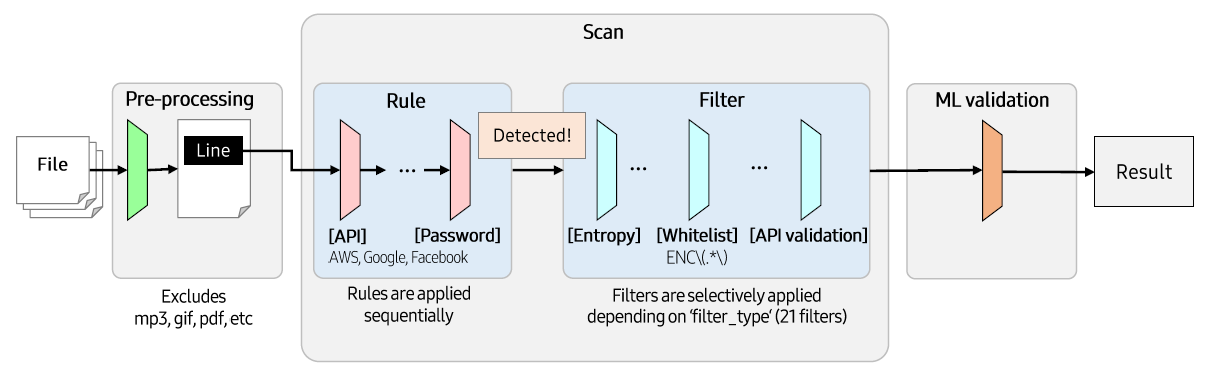
CredSweeper is largely composed of 3 parts as follows. (Pre-processing, Scan, ML validation)
Pre-processing
When paths to scan are entered, get the files in that paths and the files are excluded based on the list created by config.json.
config.json
...
"exclude": {
    "pattern": [
        ...
    ],
    "extension": [
        ".7z",
        ".JPG",
        ...

    ],
    "path": [
        "/.git/",
        "/.idea/",
        ...
    ]
}
...
Scan
Basically, scanning is performed for each file path, and it is performed based on the Rule_s. Scanning method differs from scan type of the Rule, which is assigned when the Rule is generated. There are 3 scan types: SinglePattern, MultiPattern, and PEMKeyPattern. Below is the description of the each scan type and its scanning method.
SinglePattern - When : The Rule has only 1 pattern. - How : Check if a single line Rule pattern present in the line.
MultiPattern - When : The Rule has 2 patterns. - How : Check if a line is a part of a multi-line credential and the remaining part exists within 10 lines below.
PEMKeyPattern - When : The Rule type is pem_key. - How : Check if a line’s entropy is high enough and the line have no substring with 5 same consecutive characters. (like ‘AAAAA’)
Rule
Each Rule is dedicated to detect a specific type of credential, imported from config.yaml at the runtime.
config.yaml
...
- name: API
severity: medium
type: keyword
values:
- api
filter_type: GeneralKeyword
use_ml: true
validations: []
- name: AWS Client ID
...
Rule Attributes
severity - Severity
...
class Severity(Enum):
    CRITICAL = "critical"
    HIGH = "high"
    MEDIUM = "medium"
    LOW = "low"
...
type - RuleType
...
class RuleType(Enum):
    KEYWORD = "keyword"
    PATTERN = "pattern"
    PEM_KEY = "pem_key"
...
values - keyword : The keywords you want to detect. If you want to detect multiple keywords, you can write them as follows : password|passwd|pwd. - pattern : The patterns you want to detect. For more accurate detection, it is recommended to specify ?P<value> in the patterns : (?P<value>AIza[0-9A-Za-z-_]{35}).
filter_type - The type of the Filter group you want to apply. Filter groups implemented are as follows: GeneralKeyword, GeneralPattern, PasswordKeyword, and UrlCredentials.
use_ml - The attribute to set whether to perform ML validation. If true, ML validation will be performed.
validations - The type of the validation you want to apply. Validations implemented are as follows: GithubTokenValidation, GoogleApiKeyValidation, GoogleMultiValidation, MailchimpKeyValidation, StackTokenValidation, SquareAccessTokenValidation, SquareClientIdValidation, and StripeApiKeyValidation.
Filter
Check the detected candidates from the formal step. If a candidate is caught by the Filter, it is removed from the candidates set. There are 21 filters and 4 filter groups. Filter group is a set of Filter_s, which is designed to use many Filter_s effectively at the same time.
ML validation
CredSweeper provides pre-trained ML models to filter false credential lines. Users can use ML validation by explicitly setting the command option.
python -m credsweeper --ml_validation --path $TARGET_REPO
ML model classifies whether the target line is a credential or not. The model is constructed by the combination of Linear Regression model and biLSTM model using character set, trained by sample credential lines. Below figure is the model architecture.
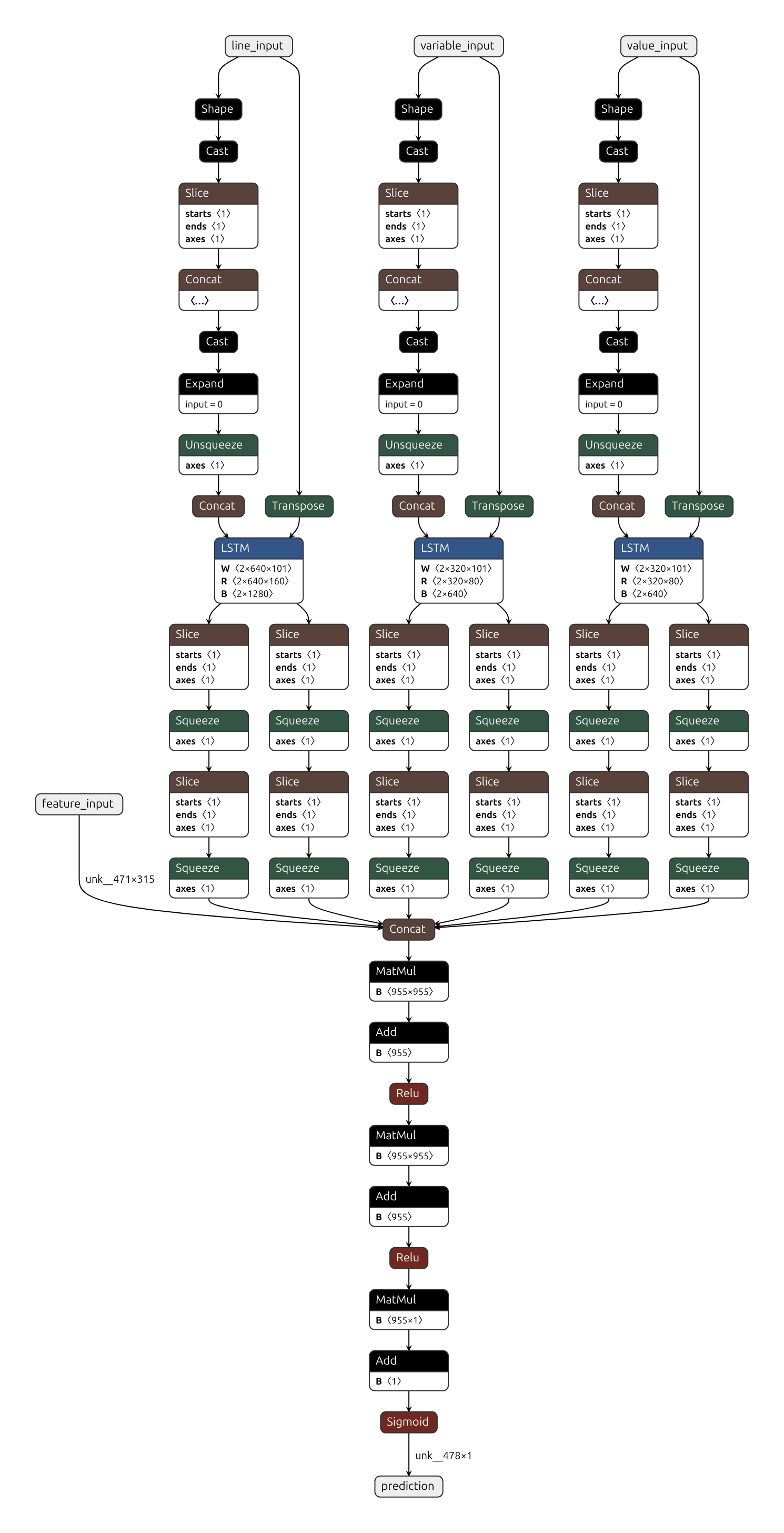
Linear Regression model takes feature vector with a value of 1 if the corresponding rule is met, and 0 if not as an input. For the complete description of the rules applied, you can read this publication.
@INPROCEEDINGS{9027350,
    author={Saha, Aakanksha and Denning, Tamara and Srikumar, Vivek and Kasera, Sneha Kumar},
    booktitle={2020 International Conference on COMmunication Systems   NETworkS (COMSNETS)},
    title={Secrets in Source Code: Reducing False Positives using Machine Learning},
    year={2020},
    pages={168-175},
    doi={10.1109/COMSNETS48256.2020.9027350}
}